Monday, May 17, 2010

Artist Statement

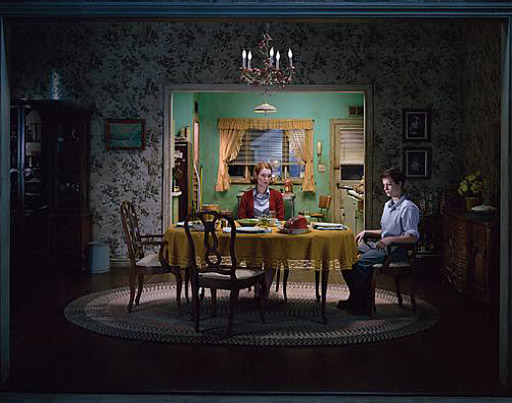
I started photography in 2009, so it is not difficult to guess that I'm a novice at best. So far, I have only dabbled in a few techniques or genres of photography, but I hope to be able to expand my pallet by learning as much as possible. I love every step that is involved in the creation of a photo, from the fostering of a small Idea to the discovery of the exact composition and the process of post editing. What I find to be the most wonderful thing about photography is that inspiration can be found anywhere and everywhere. These inspirations can be straight forward but are more often than not, obscure or seemingly random in origin. I have found several photographers whose work interests me. Gregory Crewdson, with his familiar yet alienating photographs set in American suburbia, was the first to interest me. Another photographer who I consider to be great is Annie Leibovitz, with her mastery of lighting in portraits, a gift that I greatly respect but have no skill in what so ever. I Hope to be able to continue with new and different forms of photography as I continue to learn and experience more.

My website can be found here

Tuesday, May 11, 2010

Tilt-Shift Effect

Before:
After:
(Click here for tutorial)

This was my attempt at using the tilt-shift affect in Photoshop. I have no real complaints, but if I were to retry using this affect I would choose a higher vantage point to take the photo so that the photo would more closely resemble a miniature set.

Thursday, March 25, 2010

Technical Questions 2

1. The original image was 8.64 inches by 12.96 inches.

2. The new image will be 8.64 inches by 17 inches. This image has a space of 8.64 inches by4.04 inces added to the left side.

3. The "blue line" is known as a guide.

4. To duplicate the background layer select and drag it to the new layer button that is left of the trash icon. To delete it, simply drag the duplicate into the trash.

5. To make a new folder, press the new folder button in between the adjustments and new layer icons.

6. Currently, the background layer is outside of the folder. To move the background into the folder, you have to duplicate the background, drag the copy into the folder, lock the duplicate and delete the original background. You have to make a duplicate of the background because the background cannot be moved or unlocked when it is the only layer.

Thursday, March 18, 2010

Technical Questions

1. The Gradient tool is the tool right of the eraser which shows a square shifting from white to black. The Pen tool is left of the Text tool and shows a quill tip. The Shape tool is directly below the Text tool and shows either a square, a line, a rounded rectangle, an ellipse, a polygon, or a custom shape (blob).

2. Using the gradient tool from the bottom to the top of the page with these settings would create a black gradient from the bottom of the page that shifts to white when it reaches the top.

3. to change the gradient's transitions: access the button second to left, directly under the PHOTOSHOP button. this will open a menu where you can chose the behavior of your new gradient. from this menu, simply select foreground to transparent.

4. With these settings selected, vector art has been made. You can tell this because the shape layers button on the far left is selected instead of the paths button, which would create a path instead of vector art.

5. This is not a closed path. You can tell because there are two unconnected anchor points. To close the path you would need to connect these two points.

6. To create a rectangle: select the shape tool and set it to rectangle. With the current settings, the rectangle would be black

7. to change the Shape tool from rectangle to circle simply click and hold the Shape tool and select the circle from the menu that pops up.

8. 300 dpi is the setting of choice for proper screen resolution.

9. dpi stands for "dots per inch."

10. both images would print at the same size. They have the same image size, one is simply magnified (66.7%), making it appear larger than the other (50%).

BONUS: ppi stands for "pixels per inch"

Monday, March 8, 2010

Text in Advertising.

1) This advertisement is for The iPhone by Apple. Vector art is used to show that there are countless apps for the Iphone.

-I studied the text: "Your iPhone gets better with every new app."


-Serif: sans serif
-Weight: bold
-thick/thin contrast: low contrast
-width: normal

-I think the text fits with how apple wishes to portray the iPhone, clean and crisp. The text is uniform, the san serif text together with the normal width provides a very modern look. While the bold text and low contrast makes the text easily noticeable to the eye.

2) This advertisement is for the DS by Nintendo. The text is energetic to make the DS seem fun and exciting.

-I studied the text: "express more with a touch"

-serif: sans serif
-weight: Ultra Bold
-thick/ thin contrast: med. contrast
-weight: expanded

- The text in this ad is energetic, attention grabbing, and fits this ad well. The text is ultra bold so that it extremely easy to notice. Although it appears to have been scribbled, the text is fairly uniform, with sans serif and only a medium contrast. The text is also slightly expanded which, like the ultra boldness of it, makes the text even more attention grabbing and fun.


3) this is an advertisement for Samsung phones.

-I studied the text: "express you musical side"

- serif: sans serif
- weight: extra bold
- thick/ thin contrast: no contrast
- width: expanded

- The text in this advertisement is also fitting of its ad. The text is set so that it seems electronic. The sans serif with the lack of contrast makes the text crisp and well defined while the expanded width with the extra bolding creates more contrast form the dimmed background.

Friday, February 5, 2010

criticisms of self-criticism part 1


1) Formally, I think that the aperture and shutter speed and ISO are acceptable, the subject is in focus and there is no over-exposure or under-exposure. Also there appears to be little to no noise in the photo. Too improve the photo, i would change the white balance. There seems to be a slight tint in the background that could be easily changed with a different setting, like shade or cloudy.

2) conceptually, I'm happy with the way the subject seems to be addressing the background although perhaps the picture should have been taken from farther away so that the whole statue could be seen.

3) Personally, I think that the sense of a great speech or of the subject addressing the masses was captured well enough although it does need several edits, either a photo filter or a color balance and then some vignetting to bring attention to the subject as well as the background, which i feel is just as important in the photo.

Thursday, February 4, 2010

Wednesday, January 13, 2010

Emulation Proposal


For my emulation project, I plan to emulate Gregory Crewdson. I have chosen to emulate Crewdson because of the way he creates his photos. Crewdson uses complex lighting, realistic settings, and well chosen actors. He doesn't just "point and shoot," he takes time staking effort to make create absolute perfection for his photos. He gives a surreal feel to his photos that is truly unique. In Crewdson's photos the environments a full of life and detail but the people seem to not be all there. They are vacant, depressing, and taciturn. The settings are realistic but the subjects give a unworldly aura which is very suspenseful. Crewdson uses lighting to draw attention to the isolation of his subjects from the world around them. For my photos, I plan use lighting as similar as Crewdson as possible. I will also focus on isolation from an in depth world in all of my photos. The setting will most likely be my house, I may use my front porch where i can have an outside view while still being able to use lighting with clip on lamps. I may also use my living room - if I do that i will put more photos and other items to add more depth to the setting. One foreseeable problem with working on the porch will be that the ideal time for taking the photo would be during dusk, which would ony give a sliver of time to take the photos without error. I will set up for the photos using similar ways to Crewdson, but i will make add certain things to the settings to add a touch of my own while still fitting Crewdson's usual parameters. With this style i wish to capture the invisible barriers sometimes put between friends and family. The subjects will be together spatially but they will be divided by their detachment from their surroundings.

Thursday, January 7, 2010

Emulation Project - Part 2


ROBERT ADAMS: Adams is well known for black & White photos of vistas of cities. The city is usually in the back ground while an aspect of nature is in the mid / fore ground. They have a calm mood and are devoid of motion. Nature, in Adam's photos, is often surrounded by civilization. Their is no plot or story in his photos, they are simply "there." They exist not tell a story. They have moods certainly, but no plot or exact theme. they are relaxing and visually stimulating. This lack of extra detail allows us to enjoy the photo simply for what it is instead of any hidden meanings.


JACQUES-HENRI LARTIGUE: Lartigue do not stand out because of his lighting or the way he edits them (which he doesn't), instead, they are recognizable for their subjects. their actors, their props, and the scenes which they capture. Almost all of Lartigue's photos are simple black & white photographs which depict both children and adults in whimsical scenarios; from a child playing with an elaborate toy to an older man in a suit sitting in the middle of a pond. They are childish, lighthearted photos depicting one thing above all else, and that is simple, worry-free fun.


Gregory Crewdson: Crewdson is a master of lighting. He could been in almost any setting and make it look like a still straight from a movie. Crewdson skillfully uses lighting to change the mood to a point that makes his photos feel surreal (even without the seemingly dead people that fill some of his photographs) Crewdson's photos are craftily created with professional lighting, and creative use of actors and props. His photos are crafted extraordinarily and often have underlining themes of anxiety or fear.

Emulation Project - Part 1


STEPHEN SHORE


Meeting Street, Charleston, South Carolina

August 3, 1975


JACQUES-HENRI LARTIGUE

Zissou, Rouzat


1911


GARY WINOGRAND

Untitled

1950s


ROBERT ADAMS

On Signal Hill, Overlooking Long Beach

1983


GREGORY CREWDSON

Untitled

2006